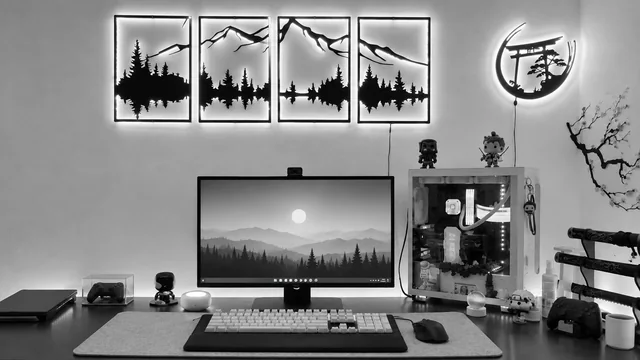
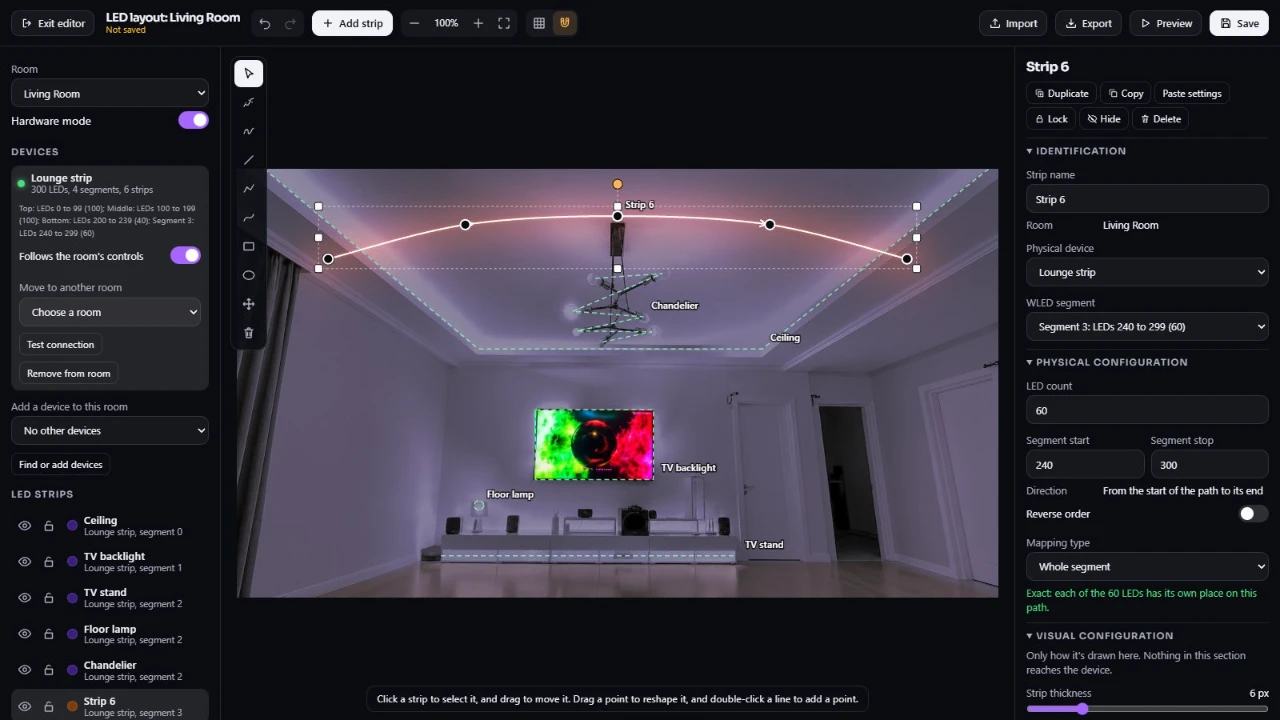
Start with a photo of your space. The strips on the picture map to the lights in your room, so you can see exactly which zone you’re changing.
Office · actual project photo
Wall art selected · 64 LEDs
See how it works
Choose a zone to control its power, brightness, color or effect. Connected WLED devices report their real pixels and state. Arrange devices into named groups, work with individual zones, or change the whole room. Light spilling onto the walls is an estimate, calculated from the drawn paths.
Draw the light.
Two strips, two paths on your photo. Give each a device and a segment. Your layout becomes a control surface for the real installation.
Guided layout demo · the Office’s actual strip paths
Monitor backlight → Office WLED · segment 0
See how it works
In the editor, click along the photo to draw a strip, then choose its device and segment. Set the LED count, position, direction and start/stop range for pixel mapping. In a 3D room, set width, depth and height in metres, then position and size furniture and lights. WLED segments give independent zones their own LEDs; zones sharing a segment always match.
A color at the edge of the picture becomes a color behind your monitor. Watch the bright patch travel: the source, backlight and spiral use the same sampled pixels.
Source frameMapped monitor lightSee how it works
Use a zone’s room position or draw an area on the screen. Map one average color, run along selected edges, or spread slices left to right or bottom to top. Reverse direction and adjust edge depth. Saver Mode samples the screen’s edges; black-bar detection keeps the mapping inside the picture.
Save screen settings as named profiles, or keep the layout in a scene. The installed app asks you to share a screen each session; protected video may appear black. This public preview uses a generated frame and never captures your screen.
Music in motion.
Let the bass carry the pulse. Add midrange movement and treble accents. Each part of the sound gives the room something different to do.
Demo off · start to see the frequency response
Generated audio signal · 122 BPM · silent demoSee how it works
Choose Bass Pulse, Spectrum Analyzer or Frequency Wave in the app. Tune sensitivity, attack and decay, then assign bass, midrange or treble to a zone. The spiral’s first strand follows bass; its second follows the higher accents.
The installed app analyzes a microphone or supported shared audio. Microphone access requires permission and a secure address such as localhost; shared system audio depends on the browser and platform. This page reuses the simulator’s generated signal and plays no sound.
One scene. Several devices.
Your monitor follows the picture. Your desk carries a wave. The wall lights breathe. One scene keeps them on the same clock, with a different part for every zone.
Office · all three zones followingSee how it works
Save current lighting as a scene, including zone settings and the screen layout. Select a room, a device or a zone to change only that selection. Turn off “Follows the room’s controls” to exclude a device from room power, brightness, scenes and effects.
Scenes can span rooms. In the installed app, Automations apply them on a schedule, at sunrise or sunset, when someone arrives or leaves, or when a device or sensor changes. They run while Heselion is running on a computer, a hub or the Android app, and the online simulator leaves them out. The installed app also has a scene timeline: scenes and effects one after another, started by hand or by an automation. The simulator leaves it out.
Same lights. A different feeling.
Keep the strip. Change its movement. Compare two effects, then switch the palette without changing the effect.
Breathe · SunsetSee how it works
These previews run the project’s effect functions. A palette changes the colors while the effect defines the motion. In the app, tune speed and intensity, layer an overlay, or save the result as a scene. WLED presets live on the controller and can restore its own settings.
Custom live effects need the app open and visible, with per-LED streaming enabled. Simulation approximates hardware output; a connected WLED device is the authority for its actual pixels.
See the room in a new light.
Your room is the control surface. Preview the light on a photo, or build a furnished 3D room with dimensions and placed lights.
The app’s room view and dashboard visualize the lighting engine’s final per-LED pixels. Photo layouts align those pixels to your drawn paths. Configured 3D rooms use your dimensions and light positions, with individual LED colors along each strip. Lamps, panels, TVs, sensors and other connected devices can be placed in them, floor by floor, and light the room with what they report.
Relight and wall spill are visual estimates, not photometric calculations. The public preview uses virtual devices; only a connected controller can confirm hardware output.
Find WLED on your local network, assign its segments and see what the device reports back. Then add the plugs, TVs, speakers and bridges around it. When something goes offline, you see that too.
Local discovery, power, brightness, color, effects, palettes, segments, presets and live per-LED output. Device-reported state confirms changes.
Philips Hue
Bridge discovery and pairing; power, dimming, color and transition duration. Entertainment-area streaming synchronizes compatible bulbs; ordinary control updates bulbs one at a time.
TP-Link Tapo
Local discovery and account pairing; power, brightness and color where the model supports them. Credentials are checked on the device. These are whole-light commands, not per-LED output.
Philips TV / Ambilight
Discovery and PIN pairing where needed; TV power and standby on supported models, Ambilight brightness and color, Follow video and available Follow audio styles. Heselion effects send one color per side at the TV’s pace. Support varies by model and firmware; the app may show the last command rather than verified TV state.
Real devices need the installed local web or Android app on your home network. The public simulator uses virtual devices. PC RGB through OpenRGB is a desktop-app feature.
All 21 integrations, and how each was checked
The app’s Add a device wizard finds a device, says how it will be reached, connects it and reads it back. Local connections are preferred; cloud paths are always labelled. Home Assistant, MQTT, Zigbee, Matter and Z-Wave join through a bridge you run.
WLED
LED strips, matrices. Works on your network. Checked on real devices.
Philips Hue
Bulbs, light strips. Works on your network. Tested with simulated devices only.
Govee
Strips, light bars, lamps. Works on your network. Tested with simulated devices only.
Nanoleaf
Panels, shapes, lines. Works on your network. Tested with simulated devices only.
Philips TV
TVs, Ambilight. Works on your network. Checked on real devices.
Samsung TV
TVs. Works on your network. Tested with simulated devices only.
LG TV
TVs. Works on your network. Tested with simulated devices only.
TP-Link Tapo
Bulbs, light strips. Works on your network. Tested with simulated devices only.
Shelly
Relays, dimmers, covers, thermostats, valves, sensors. Works on your network. Tested with simulated devices only.
Twinkly
String lights. Works on your network. Tested with simulated devices only.
Yeelight
Bulbs, strips. Works on your network. Tested with simulated devices only.
Cololight
Panels. Works on your network. Tested with simulated devices only.
PC RGB (OpenRGB)
PC components. Works on your network. Tested with simulated devices only.
Home Assistant
Lights, switches, sensors, covers, climate, fans, media players. Works on your network. Tested with simulated devices only.
MQTT (custom, Tasmota, ESPHome, Shelly MQTT)
Switches, lights, sensors. Works on your network. Tested with the real service software.
Zigbee (Zigbee2MQTT)
Lights, plugs, switches, sensors. Works on your network. Tested with simulated devices only.
Matter (Wi-Fi and Thread)
Lights, plugs, sensors, covers, thermostats. Works on your network. Tested with simulated devices only.
Z-Wave
Switches, sensors, locks. Works on your network. Tested with simulated devices only.
Tuya / Smart Life
Plugs, lights, switches, curtains. Works on your network. Tested with simulated devices only.
TP-Link Kasa
Plugs, power strips, switches, dimmers, bulbs. Works on your network. Tested with simulated devices only.
Denon / Marantz receivers, Sonos speakers
AV receivers, speakers. Works on your network. Tested with simulated devices only.
Android TV / Google TV
TVs, streamers. Planned, not built.
The dashboard adds up what plugs and meters report, shows each bridge’s health and groups rooms by floor. In the simulator those readings are generated.
Use a phone on your home Wi-Fi for everyday controls. Copies signed in to the same account can control each other’s rooms while the original PC keeps driving its lights. Session controls show ownership and let you take over or release a controller.
Accounts require a configured account service; the public simulator offers a sample profile. Rooms, scenes and layouts stay in each browser’s local storage.
One4All adds remote power, brightness and color through an Android or local-web gateway kept online at home. Credentials stay on that gateway. The desktop app does not enable remote control.
Save your lighting as a scene. Keep named screen profiles for film nights and gaming, then recall the setup when you want it.
Same installation · a recalled palette
Film preview · warm palette, edge mapping
Illustrative profiles · changes this preview only
Available today & planned
Available
Saved scenes across rooms, named screen profiles, device presets and browser-local layouts. Automations in the installed app can apply a scene by schedule, presence, sensor or device change.
Installed app only
A scene timeline, on plans that include it. It is not in the online simulator.
Scenes and profiles stay in the browser where you saved them. This preview does not create a profile in the app.
Now give it a room.
The light makes more sense when it’s yours. Explore the full simulator, draw a layout, and find a scene that feels like home.
Remote power, brightness and color (needs an online home gateway)
–Not included
–Not included
–Not included
–Not included
✓Included
✓Included
Commercial license
–Not included
–Not included
–Not included
–Not included
–Not included
✓Included by agreement
Support from the creator of Heselion
–Not included
–Not included
–Not included
–Not included
–Not included
✓Included by agreement
Prices are in USD. Commercial license and support from the creator of Heselion are agreements, not software features. A new account gets 7 days of Heselion Pro Max free once its email is confirmed; no card is needed, and nothing is charged when it ends. Checkout is not enabled yet, so nothing can be bought on this site.
Effect Studio, the scene timeline, LED mapping, the 3D room designer and several screens at once are in the installed app, not in this online simulator. Nothing here has been run on real lights yet. Checkout is not enabled in the current catalog.